Horizon Blue
- 4.7
- Rating
- 100.00K
- Installs
- Free
- Price

 Analysis by App-foxy
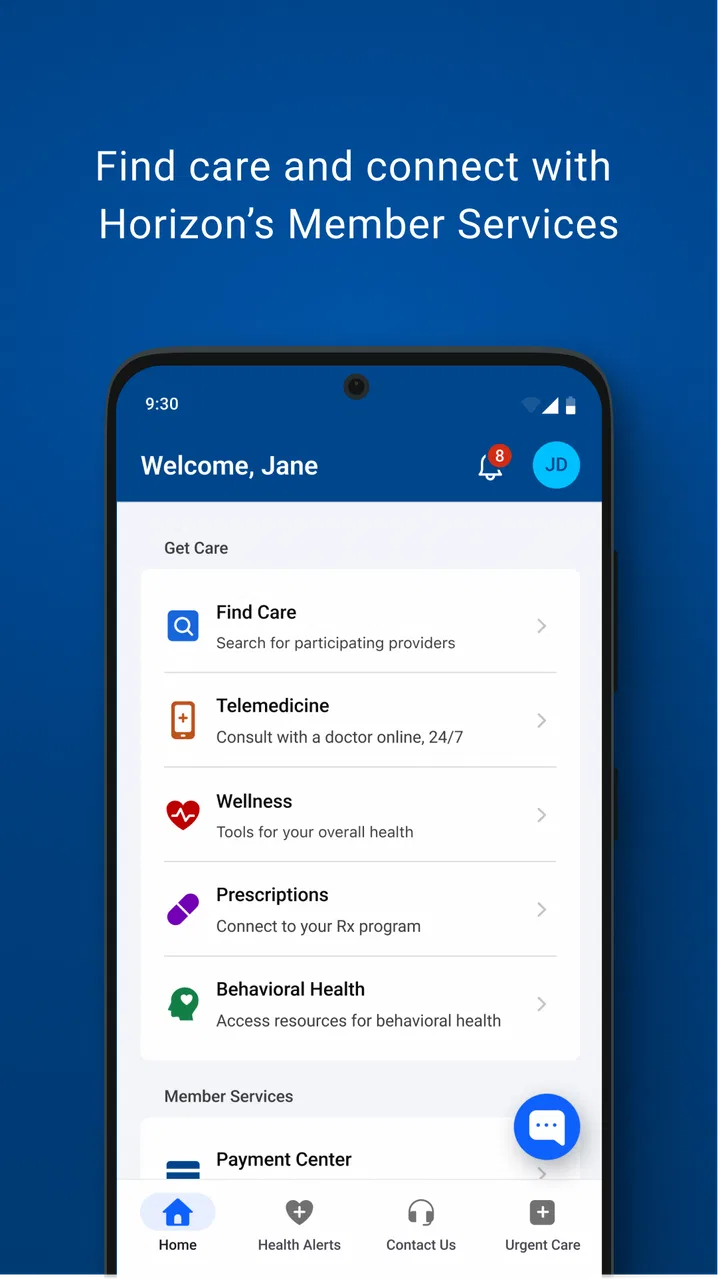
Managing health-plan details is rarely something I want to do for fun. Usually, I open an insurance app because I need one answer quickly: whether my plan information is available, where to look for it, or what I should check before dealing with a doctor, pharmacy, or bill. Horizon Blue is built for that practical moment. It is a free medical app from Horizon Blue Cross Blue Shield, and its central purpose is to make health-plan information easier to access from a mobile device.
That sounds modest, but it is the right focus for an insurance companion. I would not judge it like a fitness tracker, symptom checker, or telemedicine service. Its value is tied to how much simpler it makes plan-related tasks compared with searching through paperwork, signing into a general website, or calling customer support for every small question. After spending time with it, my impression is that it works best as a convenient access point for existing members rather than as a complete healthcare destination.
What Horizon Blue is useful for in everyday health-plan management
The app belongs in the medical category, but the experience is administrative rather than clinical. I see it as a pocket doorway to health-plan information, not a replacement for a physician and not a tool for diagnosing symptoms. That distinction matters because someone looking for medication reminders, exercise tracking, urgent medical advice, or appointment management may expect much more than this app is designed to provide.
You May Also Like

 Blood Strike: 2.5 Anniversary
Blood Strike’s Loadouts Turn Every Drop Into a Tactical Gamble
A close look at Blood Strike’s custom loadouts: how fast access to signature weapons reshapes its battle royale rhythm, rewards preparation, and narrows the gap between fights.

 Pandora - Music & Podcasts
Pandora’s Music Is Easy to Start, but Harder to Recover
Pandora’s strength is its low-effort path from a seed to a station. Its weak spot is how much confidence it asks you to place in connection, setup, and quiet recovery.

 8 Ball Pool
 Is Built on Rivalries, Rematches, and Routine
A close look at the rivalries, rematches, shared routines, and unanswered safety questions that turn a quick pool match into a persistent mobile community.

 Samsung Music
’s Quiet Strength Is Playing What You Already Own
Its reach comes less from spectacle than from dependable access to a personal library. That simplicity is both the app’s strongest retention engine and its ceiling.

 AccuWeather: Weather Radar
AccuWeather Review: A Quick, Clear Forecast for Everyday Decisions
For everyday plans, the best forecast is the one you can understand quickly. AccuWeather makes rain timing, radar, and local conditions easy to act on, with a few trade-offs.

 Hill Climb Racing
Why Hill Climb Racing Still Turns Crashes Into One More Run
A tiny car, a bumpy hill and one more upgrade: Hill Climb Racing keeps resurfacing because its simple chaos makes every near-miss feel personal.
More From Our News Desk



The developer is Horizon Blue Cross Blue Shield, which gives the app a clear connection to the health-plan information it is intended to present. That connection is its main advantage over a generic health organizer. A separate notes app can store an insurance number, and a browser can open an insurer’s website, but neither option is as purpose-built for keeping plan access close at hand.
In a realistic situation, I might be standing at a medical office reception desk and realize I need to check a plan detail before confirming an appointment. The useful part is not entertainment or customization; it is avoiding a hunt through a wallet, email inbox, or folder at home. I can also imagine opening it before a pharmacy visit, while preparing for a new provider, or when a family member asks me to locate health-plan information quickly.
One practical habit I would recommend is opening the app before an appointment rather than waiting until check-in. That gives me time to make sure I can sign in and find the information I need while I am calm and connected. Insurance questions often arrive at inconvenient moments, so treating the app as a preparation tool is more effective than treating it as an emergency solution.
The app is free to download and use in the sense that no purchase price is attached to it. That is important when judging value: the benefit comes from convenient access to plan information, not from a paid bundle of extra services. A free app can still be frustrating if it saves little time, but there is no upfront app cost to recover. For an eligible member, that makes trying it a low-risk decision.
Its audience is also broad from an age-rating perspective. It is marked for Everyone, although the health-plan context naturally makes it most relevant to people who manage their own coverage or help someone else manage theirs. A parent, caregiver, or family member may find that shared administrative role just as important as the primary policyholder’s use.
Where the convenience is strongest
The strongest value is consolidation. Instead of relying on several disconnected places for plan-related details, I can start with one app associated with the insurer. That does not eliminate every insurance task, but it gives me a predictable first stop. Predictability is underrated here: when I need information under time pressure, remembering where to begin is almost as useful as the information itself.
Another benefit is portability. Paper documents stay at home, and a desktop website is less convenient when I am away from a computer. A phone-based option fits naturally into situations where health-plan details are needed outside the house. I would especially appreciate that during travel, a new-provider visit, or a conversation where I do not have access to my filing cabinet.
There is also a useful distinction between storing information and accessing current plan information. A screenshot or handwritten note may be handy, but it can become outdated. An insurer-connected app is a better starting point when I want to check the information available through the plan rather than depend on a personal copy that I saved months ago. I would still keep important documents and contact details available elsewhere, but I would use the app as the first check.
For people who dislike navigating websites on a small screen, a dedicated mobile app can feel less cumbersome than opening a browser, searching for the correct insurer page, and signing in there. The advantage is not necessarily a dramatic feature list. It is the reduction of small steps between having a question and reaching the relevant account area.
The app has also attracted a substantial audience. It has passed one hundred thousand installs, and its average rating is 4.7 from around ten thousand ratings, with roughly one thousand one hundred written reviews. Those figures do not guarantee that every member will have a smooth experience, but they suggest that many people find the basic concept useful enough to keep using and evaluating positively.
Three smart ways I would use it
First, I would use Horizon Blue as a pre-visit checklist rather than waiting for a receptionist to ask for information. Before leaving, I would open the app, confirm that I can reach my account area, and note anything I may need to explain. This workflow turns a stressful, public moment into a quick preparation step at home.
Second, I would use it alongside, not instead of, a personal backup. I would keep essential insurance information in a secure place and avoid assuming that a single app is the only route to help. The trade-off is simple: the app is convenient for access, while a backup is valuable if my phone battery, connection, login, or the app itself becomes a problem.
Third, I would make it part of a caregiver routine. If I help a parent, partner, or child with healthcare administration, having a dedicated place to begin can reduce repeated searches. I would still pay close attention to whose account is open before discussing personal information in a shared setting. Convenience should not lead to careless handling of someone else’s health details.
These uses go beyond the short store summary because they focus on timing and workflow. The app is most helpful when I prepare before a task, use it as a first stop, and maintain a backup plan. That is a more realistic way to get value from an insurance app than expecting it to solve every healthcare problem.
What it should not replace
I would not open this app expecting medical advice, diagnosis, treatment decisions, or emergency guidance. A health-plan information tool and a clinical service answer different questions. If I have a serious symptom, I need an appropriate medical professional or emergency service, not an insurance account screen. That limitation is not a defect so much as a boundary that users should understand before downloading it.
I also would not assume that a mobile account removes the need to communicate with providers or the insurer. Healthcare administration can involve details that depend on a specific claim, provider, service, or policy situation. An app can make information easier to reach, but it cannot make every coverage question simple. When a decision has financial or medical consequences, I would use the app to gather context and then confirm the issue through the proper channel.
This is where the usual alternatives have a role. A browser-based member portal may be preferable when I need a larger screen, when I am printing or comparing several documents, or when I am already working at a computer. A phone call may be better when the issue is unusual, urgent, or too complicated to resolve through account information. Paper records still matter when technology is unavailable.
Compared with a generic insurance-card wallet, Horizon Blue has the advantage of being tied to a specific insurer rather than asking me to manually maintain every detail. Compared with a broad healthcare super-app, it is narrower and potentially easier to understand if my main need is plan access. The downside is equally clear: its usefulness depends heavily on whether my coverage and account relationship fit the Horizon Blue ecosystem.
That eligibility question is the first thing I would settle before investing time in setup. If I am not a Horizon Blue member or do not manage an associated plan, the app is unlikely to become a useful daily tool. In that situation, my insurer’s own app or portal is the better choice, even if another service has a more attractive interface.
Small points that affect the real experience
The app’s release history shows that it has been available since September 5, 2018, and its current version is 2.9.1. I view that as evidence of an established product rather than a brand-new experiment, but it also means I would keep my expectations practical. Longevity can support familiarity, yet it does not automatically mean every workflow will feel modern or every issue will be resolved inside the app.
Compatibility begins with Android 7.0. For someone using a relatively old phone, that requirement may be reassuring because the app is not limited to only the newest devices. At the same time, compatibility on paper is not the same as a perfect experience on every older handset. I would keep the operating system updated where possible and avoid judging the app solely by how it behaves on hardware that is no longer well supported.
One friction point with any account-based insurance app is that the value depends on successful access at the moment I need it. A forgotten password, a locked account, a slow connection, or an unexpected sign-in problem can erase the convenience temporarily. That is why I would not make the app my only source for essential information. The best workflow is to use it regularly enough to stay familiar with it, while retaining a secure backup for important situations.
Another trade-off is focus. The app’s narrow purpose is a strength when I want plan information without distractions, but it may feel limited to users who want one application for appointments, health records, prescriptions, wellness goals, and communication with clinicians. I would rather have a focused tool that does its intended job clearly than a crowded app that tries to cover everything, but people with broader needs may prefer a combination of their insurer’s portal and their healthcare provider’s tools.
Privacy also deserves sensible attention, even without turning the review into a technical audit. Health-plan information is personal. I would use a screen lock, avoid leaving the account open on a shared phone, and be careful when accessing it in public. Those habits apply to any medical app, but they matter especially when the application is designed to bring insurance information into everyday situations.
Who receives the most value
I think Horizon Blue is a good fit for members who frequently need plan information while away from home. It is particularly practical for people who attend appointments at different locations, help relatives with health administration, or simply want a quicker alternative to carrying paper documents. The free price also makes experimentation easy: if it saves even a few frustrating searches, it can justify its place on a phone without requiring a purchase decision.
It may also suit people who prefer a direct, insurer-specific starting point. Rather than building their own system from screenshots, notes, and browser bookmarks, they can try the official app associated with Horizon Blue Cross Blue Shield. I would recommend it to a friend who is already covered through the developer and wants mobile access without adding another paid service to a healthcare routine.
I would be more cautious recommending it to someone who rarely manages insurance details, has no connection to the relevant plan, or expects a full medical platform. A person looking for symptom analysis, exercise programs, or direct clinical care should look elsewhere. Someone who mainly needs complex claim explanations may also find that a phone or web conversation is more efficient than trying to solve everything through a focused mobile account tool.
Caregivers should think about account boundaries before adopting it. If I am helping another person, I would want a clear, appropriate way to access the correct information and would avoid mixing several family members’ details. The app can make the starting point easier, but it does not remove the responsibility of checking that I am viewing the right plan and protecting the right person’s information.
For a family that shares administrative duties, I would establish a simple routine: decide who checks the account, keep backup information secure, and use the app before appointments rather than during them. That routine is more valuable than downloading the app and hoping convenience appears automatically. The tool helps most when it becomes part of an organized process.
My verdict on the free value
My final view is favorable, with a clear condition: Horizon Blue is worth trying if you are connected to the Horizon Blue Cross Blue Shield health-plan ecosystem and want a convenient mobile starting point for plan information. Because it is free, the decision is mainly about usefulness and fit rather than paid value. There is no app purchase to justify, so I would judge it by whether it reduces the effort of routine insurance tasks.
I would not call it a universal healthcare solution. Its value is narrower and more practical. It can help me prepare for appointments, reach plan information away from home, and avoid relying entirely on paper or a browser. It is less suitable when I need medical guidance, detailed personal assistance, or a broad collection of health-management features.
The strongest recommendation I can give is to treat it as one reliable access point, not as the entire safety net. Install it if your coverage makes it relevant, test it before you need it, keep essential information backed up securely, and use a provider or insurer representative when the question goes beyond routine account access. For the right member, that balance makes the app genuinely useful.
In short, I see Horizon Blue as a focused, no-cost companion for people who want their health-plan information closer at hand. Its 4.7 average and established install base show that the basic idea resonates with many users, while its focused scope explains why others may want more. I would recommend it to an eligible member who values convenience and preparation, and I would tell anyone else to choose the official tool connected to their own insurer instead.
FAQs for Horizon Blue
01What is Horizon Blue and what does it offer?
Horizon Blue is a cutting-edge mobile game available for both Android and iOS platforms. It offers a thrilling blend of strategy and adventure, set in a visually stunning environment. Players can explore vast landscapes, engage in dynamic battles, and customize characters with unique abilities. The game promises an immersive experience with regular updates and events.
02Is Horizon Blue free to play, or does it require in-app purchases?
Horizon Blue is free to download and play, providing a generous amount of content at no cost. However, it does include optional in-app purchases. These purchases can enhance gameplay by unlocking special items, characters, or features, but they are not necessary to enjoy the game's core experience.
03Does Horizon Blue require an internet connection?
Yes, Horizon Blue requires a stable internet connection to function. This is essential for accessing its online features, including multiplayer modes and regular content updates. An active connection ensures you can fully experience the game's social and competitive aspects, as well as synchronize your progress across devices.
04What devices are compatible with Horizon Blue?
Horizon Blue is designed for a wide range of Android and iOS devices. It supports most recent smartphones and tablets, but it's advisable to check the specific system requirements on the app store to ensure compatibility. Devices should ideally have updated operating systems and sufficient storage space for optimal performance.
05How does Horizon Blue ensure player security and data privacy?
Horizon Blue employs robust security measures to protect player data. It complies with standard privacy regulations, ensuring that personal information is encrypted and securely stored. The game also offers options for parental controls and account management to enhance security and privacy for all users.
Pros
- Intuitive user interface enhances experience.
- Seamless integration with multiple devices.
- Regular updates with new features.
- Offline mode available for convenience.
- Strong community support and forums.
Cons
- Occasional bugs in the app's performance.
- Limited customization options.
- Subscription required for premium features.
- In-app purchases can be pricey.
- High battery usage during operation.

Horizon Blue
Gallery